Revenue
Gravity Software enables users to easily create Quotes and Orders, efficiently process physical products for shipping, and generate professional Invoices. Customer payments can be seamlessly processed through external systems or using our internally developed credit card or ACH protocols.
Process Steps
Physical Product with Order
- Create Quote/Order
- Release Order
- Pick Order Items
- Confirm Picked Items
- Ship Order Items
- Post Shipments
- Create Invoice
Physical Product without Order
- Create Invoice with Inventory Items
- Post Invoice
Service with Order
- Create Quote/Order
- Set Order Type to create Invoice directly on Release
- Release Order
- Create Invoice
Service without Order
- Create Invoice with revenue lines
- Post Invoice
Cash Receipts - Undeposited Funds
- Create GL Account for Undeposited Funds
- In Entity configuration set Deposit type to Undeposited Funds
- Create Cash Receipt
- Post
- Create Deposit Ticket
- Post
Cash Receipt with Deposit Ticket
- In Entity configuration set Deposit Type to Deposit Ticket
- Create Cash Receipt with attached Deposit Ticket
- Post Deposit ticket
Cash Receipt Processes
Gravity has two different processes for managing customer payments.
Undeposited Funds
Cash receipts are created and posted as a debit to a specific account that is defined in the Entity Configuration. Separately a Deposit Ticket is created to aggregate multiple Cash Receipts into one bank deposit. The Deposit Ticket will credit undeposited funds and debit the bank account.
Deposit Ticket
The Cash Receipt and the Deposit Ticket are created together and only the Deposit ticket is posted. One transaction is created with a debit to the banks account.
The Undeposited funds process works well with credit cards or when multiple cash receipts are aggregated into one bank deposit. The Deposit Ticket method works best when each cash receipt is deposited separately in the bank account.
Entity Configuration Settings
Default Accounts
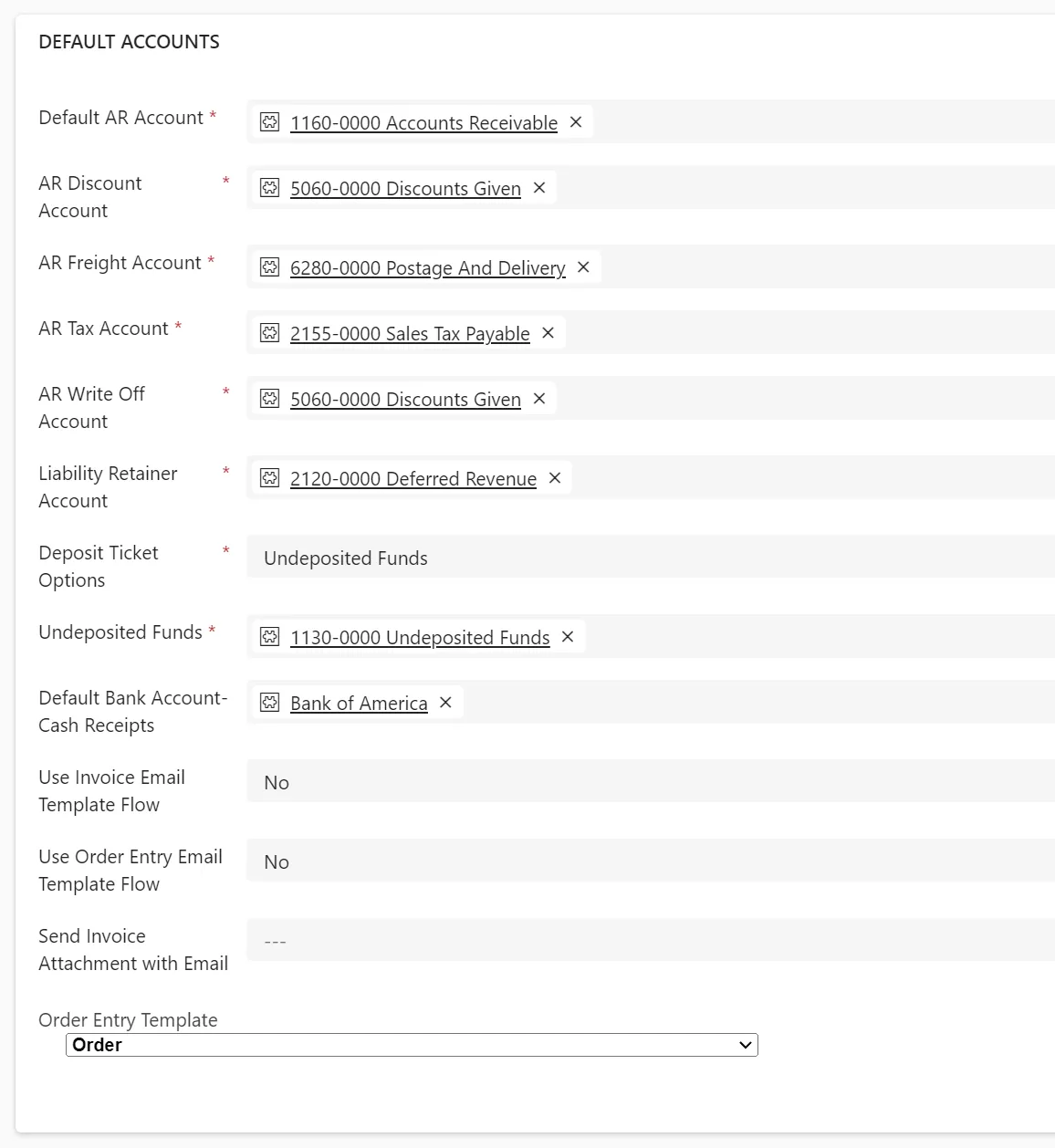
Select the default accounts to be used by Gravity. The Accounts Receivable account can be overridden from the Customer record.
Deposit Ticket Options
Choose Undeposited Funds or Deposit ticket option.
Default Bank Account
Choose the default bank account to appear with deposit tickets
Use Invoice Email Template Flow
Use the Power Automate workflow to email Invoices,
Use Order Entry Template Flow
Use the Power Automate workflow to email Orders,
Send Invoice Attachment with Email
If set to yes Gravity will include any attached notes on an Invoice as PDFs with the emailed Invoice.
Order Entry Template
If User Order Entry Template Flow is set to No, the identified template will be used for the Order confirmation email.
Credit Card Details
See Credit Card Processing