Investment Activities
Each Investment transaction is recorded as a separate investment activity. The Investment Activity types are:
- Purchase
- Sale
- Market Revaluation
- Currency Revaluation
- Interest Payment
- Dividend Payment
Currency and Market Revaluations
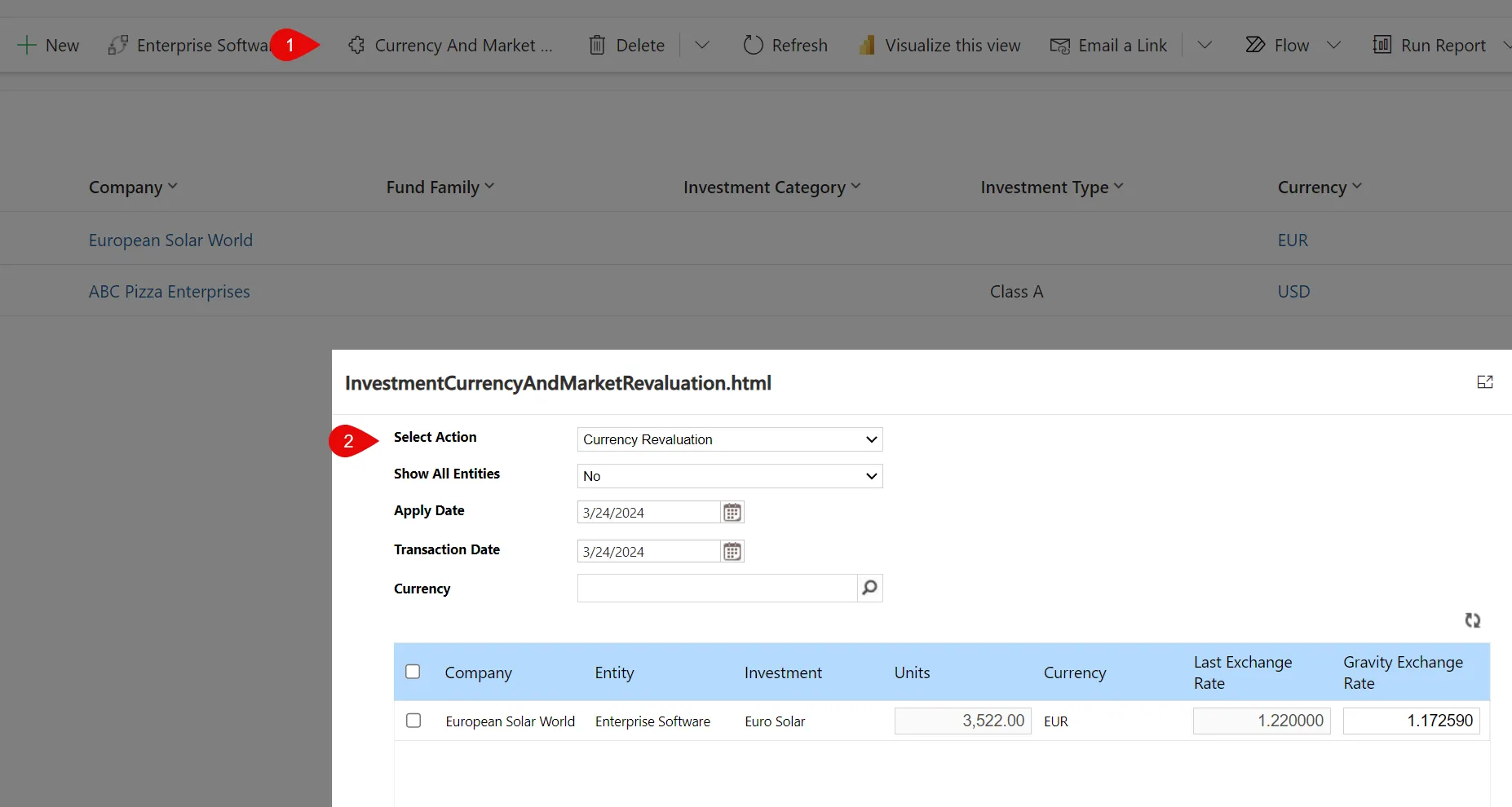
Currency and Market revaluations can be performed in bulk from the Investments grid. Selecting the menu option for Currency and Market Valuation opens the revaluation dialog.
Currency Revaluation
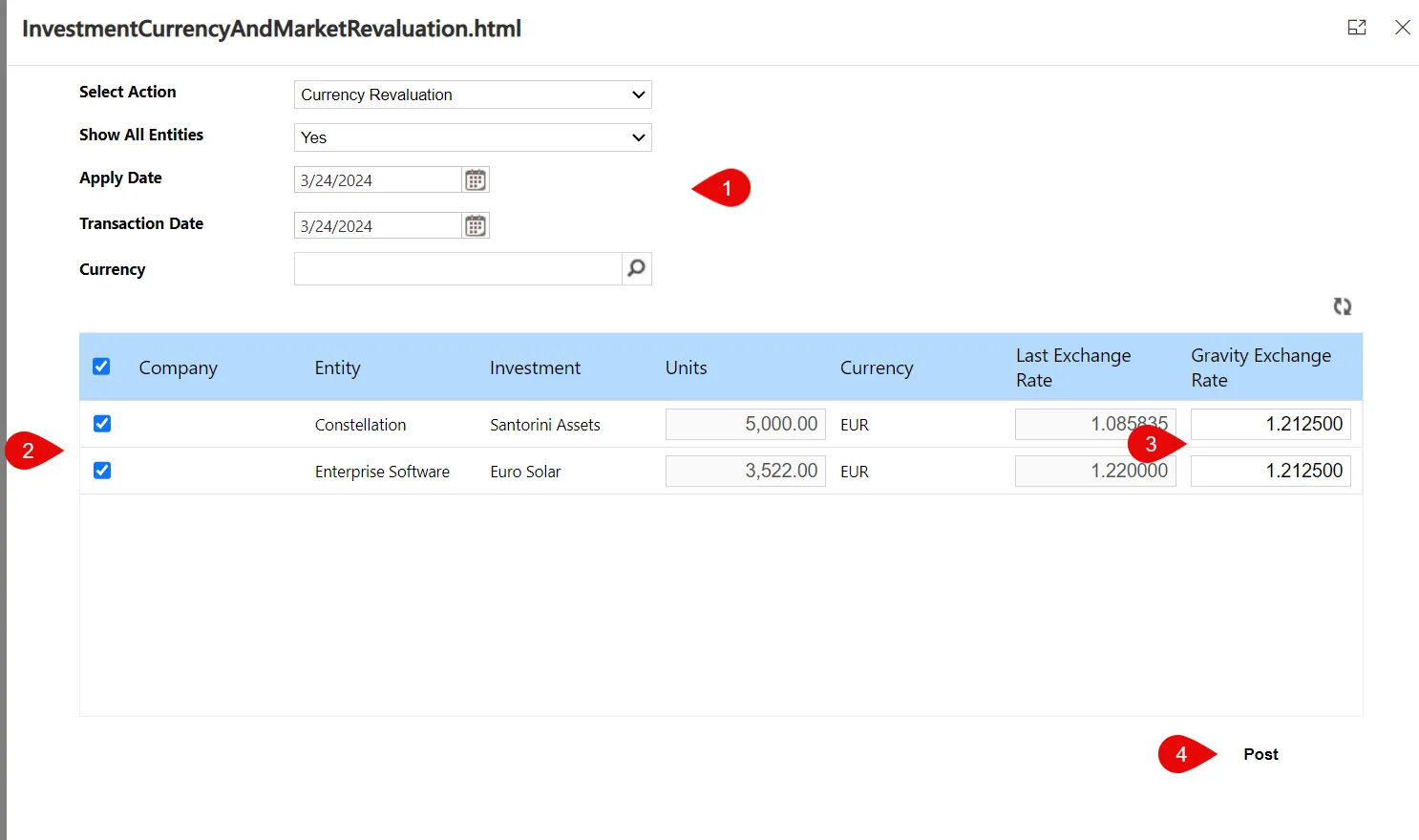
Process
- Select appropriate values in the grid header
- Select Investments to be revalued
- Enter new FX Rate
- Post transactions.
Select Action
Select Currency Revaluation
Show All Entities
You can filter the grid for the current entity or all entities to simplify the revaluation of multiple investments.
Apply Date
Apply Date represents the GL date for the Journal Entries created for the currency revaluations
Transaction Date
Transaction Date represents the date for the Entry Date created for the currency revaluations
Currency
Selecting a single currency will filter the investments for only the selected currency
Market Revaluation
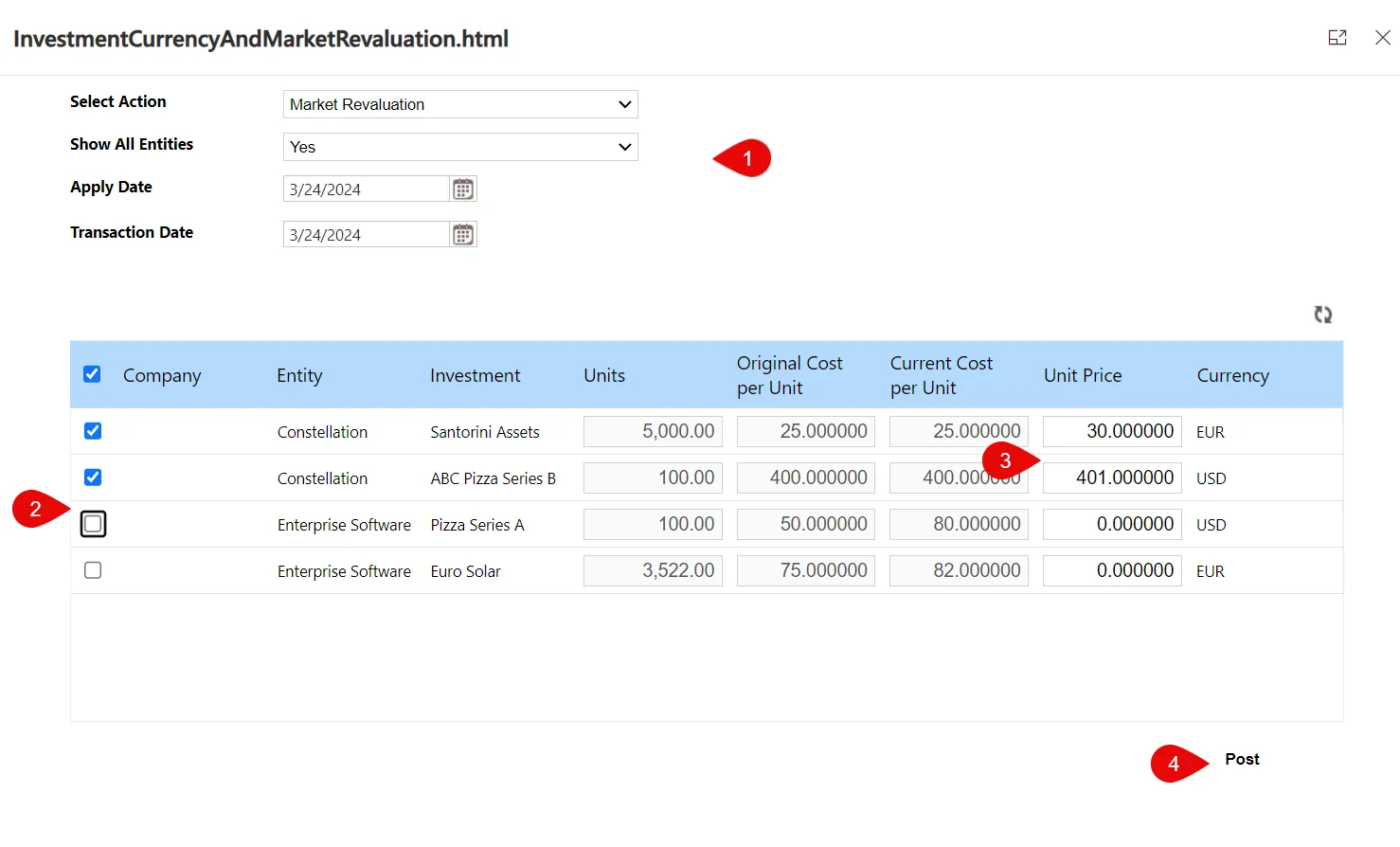
Process
- Select appropriate values in the grid header
- Select Investments to be revalued
- Enter new valuation
- Post transactions.
Select Action
Select Currency Revaluation
Show All Entities
You can filter the grid for the current entity or all entities to simplify the revaluation of multiple investments.
Apply Date
Apply Date represents the GL date for the Journal Entries created for the currency revaluations
Transaction Date
Transaction Date represents the date for the Entry Date created for the currency revaluations
Purchase/Sale/Interest Payment/Dividend Payment
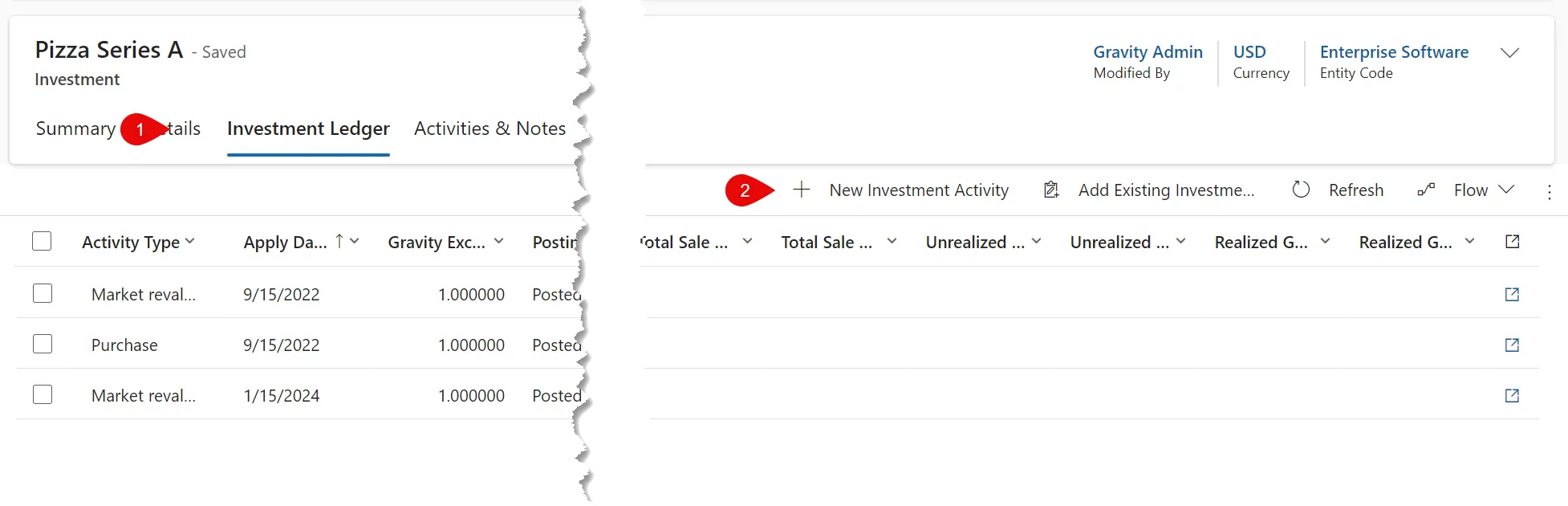
Purchase/Sale/Interest Payment/Dividend Payment transactions are entered directly from the Investment Ledger grid. Transactions saved must be Posted from the Action Menu to update the investment values.
Purchase
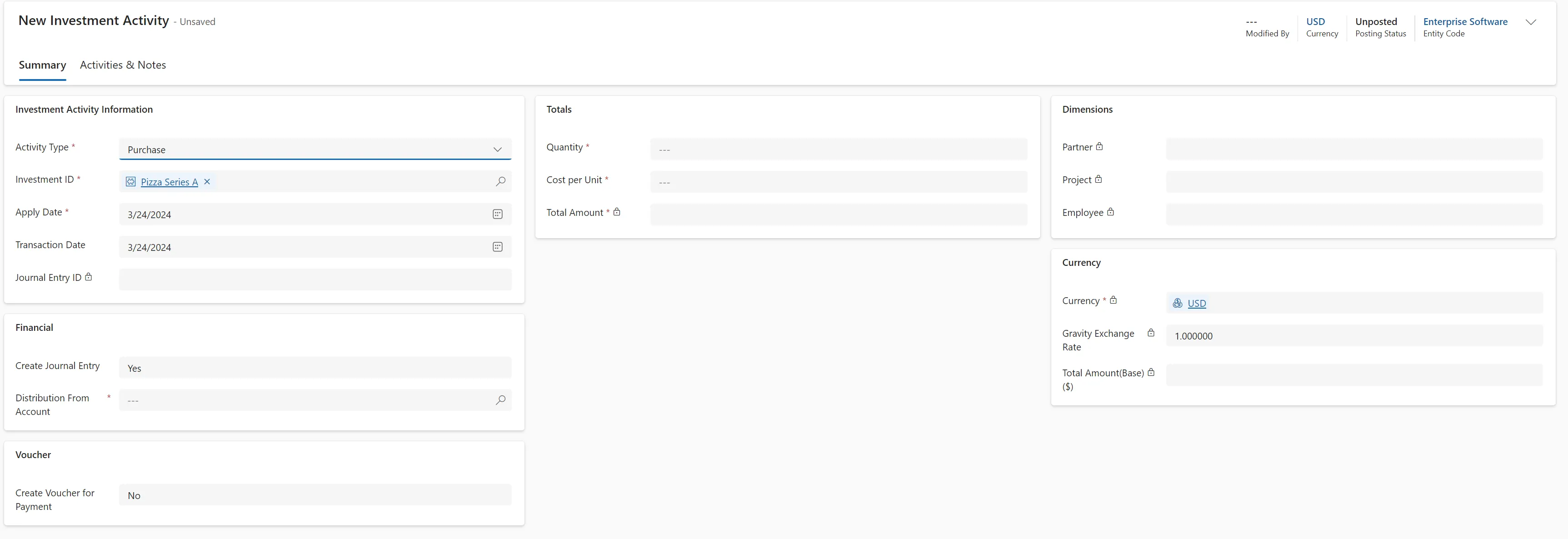
Investment Activity Information
Activity Type
Select Purchase from the activity list
Investment ID
Select the appropriate Investment
Apply Date
Apply Date represents the GL date for the Journal Entries created for the currency revaluations
Transaction Date
Transaction Date represents the date for the Entry Date created for the currency revaluations
Journal Entry ID
This field displays the Journal ID created from posting the investment transaction.
Financial
Create Journal Entry
Select Yes to create a Journal Entry in the General Ledger when the transaction is posted. If no is selected no Journal Entry will be made.
Distribution From Account
Select the GL account that would be credited in the Journal Entry created. The GL account listed in the Investment details will be debited with the entry.
Voucher
Create Voucher for Payment
Select Yes to create a Voucher in Accounts Payable to be processed through the normal AP protocols.
Total
Quantity
Enter the quantity purchased
Cost per Unit
Enter the cost per unit quantity purchased
Currency
If the investment is in a foreign currency you can override the exchange rate for the transaction
Sale
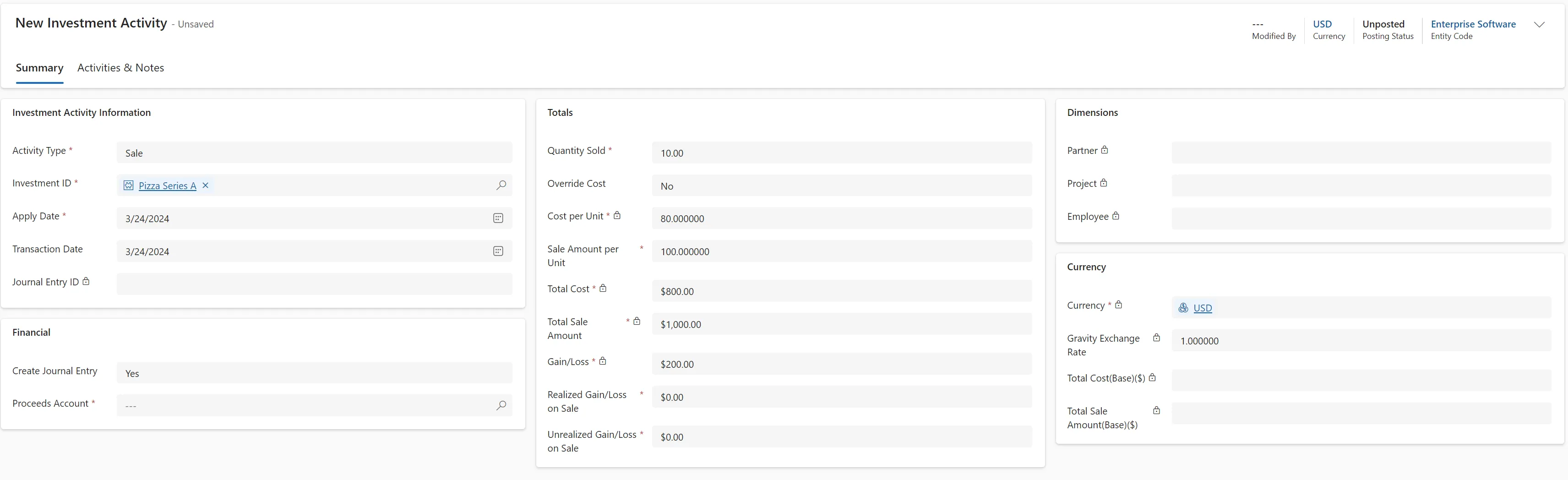
Investment Activity Information
Activity Type
Select Sale from the activity list
Investment ID
Select the appropriate Investment
Apply Date
Apply Date represents the GL date for the Journal Entries created for the currency revaluations
Transaction Date
Transaction Date represents the date for the Entry Date created for the currency revaluations
Journal Entry ID
This field displays the Journal ID created from posting the investment transaction.
Financial
Create Journal Entry
Select Yes to create a Journal Entry in the General Ledger when the transaction is posted. If no is selected no Journal Entry will be made.
Proceeds Account
Select the GL account that would be debited in the Journal Entry created. The GL account listed in the Investment details will be credited with the entry.
Total
Quantity Sold
Enter the quantity Sold
Override Cost
If set to Yes, the user can override the system generated cost.
Cost per Unit
System generated if not overridden
Sale Amount per Unit
Enter the per unit sales amount.
Total Cost/Total Sale Amount/Gain/Loss
System calculated values
Realized Gain/Loss & Unrealized Gain/Loss
Users must define the portion of the calculated gain/loss to be recorded as Realized and Unrealized
Currency
If the investment is in a foreign currency you can override the exchange rate for the transaction
Interest/Dividend Payment
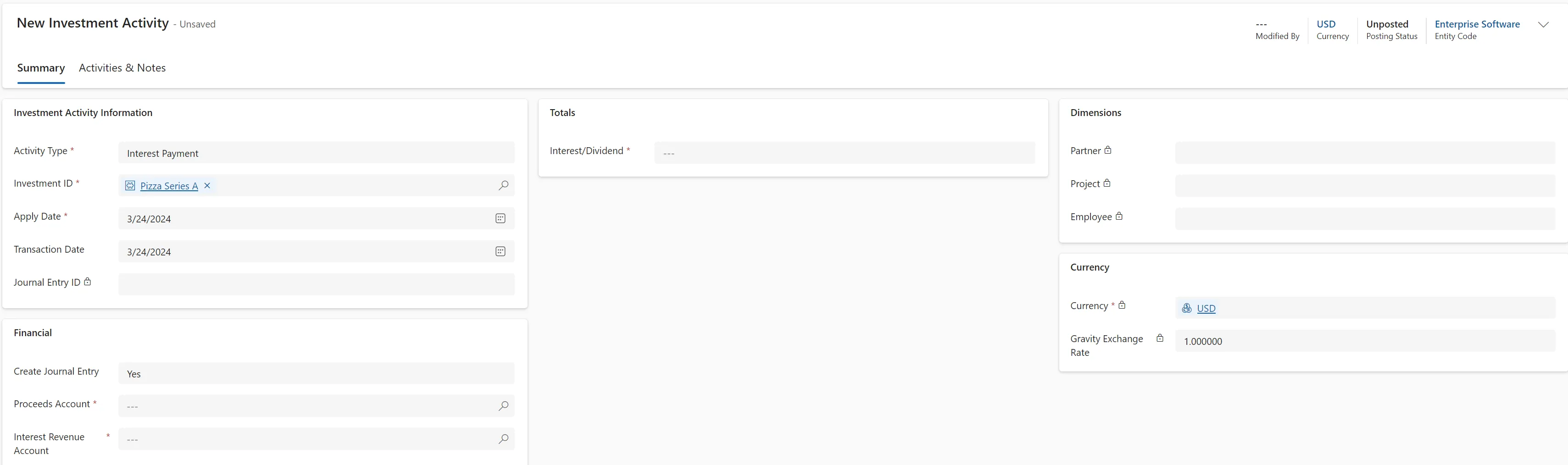
Investment Activity Information
Activity Type
Select Interest Payment or Dividend Payment from the activity list
Investment ID
Select the appropriate Investment
Apply Date
Apply Date represents the GL date for the Journal Entries created for the currency revaluations
Transaction Date
Transaction Date represents the date for the Entry Date created for the currency revaluations
Journal Entry ID
This field displays the Journal ID created from posting the investment transaction.
Financial
Create Journal Entry
Select Yes to create a Journal Entry in the General Ledger when the transaction is posted. If no is selected no Journal Entry will be made.
Proceeds Account
Select the GL account that would be debited in the Journal Entry created. The GL account listed in the Investment details will be credited with the entry.
Interest/Dividend Revenue Account
Select the GL account to be credited from the proceeds.
Total
Interest/Dividend
Enter the amount of the Interest or Dividend proceeds.
Currency
If the investment is in a foreign currency you can override the exchange rate for the transaction