Fixed Asset Books
Each Fixed Asset will have one or more fixed asset books. Each Fixed Asset book contains its own information on how the asset should be depreciated for specific purposes. Every Asset will have a book labeled "Internal (Post to GL) - FA-X" that will contain the information for posting depreciation to the General Ledger. Additional books for notation purposes only can be added, each with their own depreciation methods and information, using the "+ New Fixed Asset Book" option.
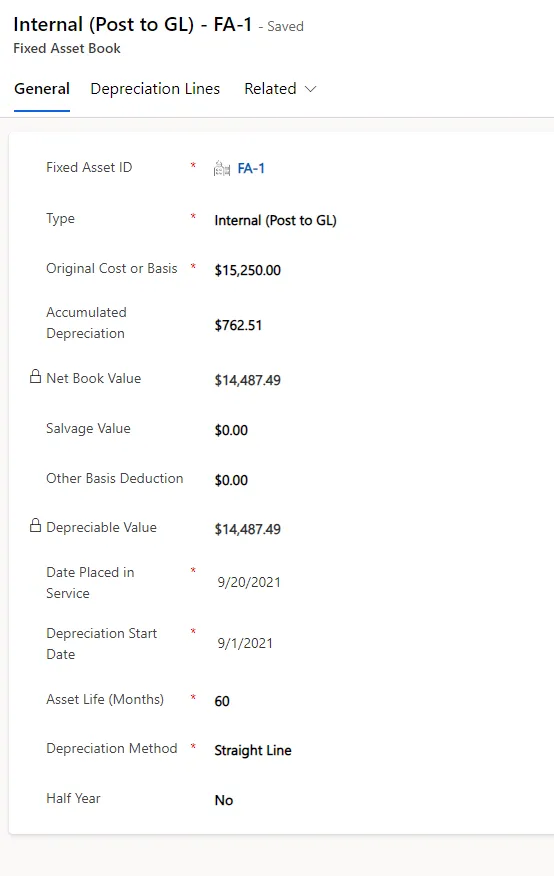
General Fields
Fixed Asset ID
The unique asset ID assigned by Gravity
Type
The asset may have more than one depreciation book. The first book created, labeled Internal will post to the General Ledger.
- Internal (Post to GL) - Reserved
- Federal
- State
- AMT
- ACE
- Property Tax
- Other 1
- Other 2
Original Cost or Basis
Enter the assets cost or basis for depreciation
Accumulated Depreciation
Typically, the system is maintained by the organization, but it can also be initialized with the accumulated depreciation data from a previous system.
Net Book Value
Calculated by Gravity
Salvage Value
Enter the salvage value if any
Other Basis Deduction
Enter any other amounts that are deducted from the asset value for calculating deprecation.
Depreciable Value
Calculated by Gravity
Date Placed in Service
Enter the date the asset was placed in service
Deprecation Start Date
Enter the date deprecation will start
Depreciable Value
Calculated by Gravity
Asset Life
Enter the Asset Life in Months
Depreciation Method
Select the Depreciation Method:
- Straight Line
- Declining Balance (150%)
- Declining Balance (150%)/SL Switch - this will switch to the straight line method when declining balance is less than SL
- Declining Balance (200%)
- Declining Balance (200%)/SL Switch - this will switch to the straight line method when declining balance is less than SL
- Manual - the calculation must be made by the user
Half Year
IF you choose a half year convention (assume 1/2 year depreciation in the first and last year no matter when the asset was purchased) select "Yes"
Deprecation Lines
After Creating and setting up books and saving them. You must Calculate Depreciation using the "Calculate" menu option on the Fixed Asset Book menu. Calculating deprecation will setup the Deprecation lines to be used by the posting process.